

Marketing leaders are under pressure to do more with the same headcount, and AI marketing automation is often pitched as the answer.
Used well, it takes real work off a team's plate, automating the manual side of reporting, lead routing, and first-draft content, so people can spend more time on the work that actually needs their judgment.
It doesn't replace the people running it, though. Automation still needs someone to configure it, review what it produces, and catch it when it drifts off course, the same operational skill set that makes a dedicated marketing ops hire worth the investment.
Used without that oversight, it can send the wrong message to the wrong segment, drift out of brand voice, and create more cleanup work than it saved.
This guide is part of GrowthAssistant's AI Marketing in 2026 series.
It breaks down what AI marketing automation actually covers today, why a number of automation projects get shelved before they pay off, and a practical framework for rolling one out safely.
It also covers how to structure a marketing operations function that uses AI to take work off people's plates without replacing their judgment.
What Is AI Marketing Automation?
AI marketing automation is predictive modeling, pattern recognition, and generative content, layered on top of traditional, rules-based marketing automation.
Classic marketing automation runs on fixed logic: if a lead fills out a form, send email A three days later.
AI adds three specific capabilities on top of that logic: it can predict a probability (which leads are likely to convert, which send time is likely to land), generate content (a first-draft email, a social post, a subject line), or detect a pattern (a metric moving outside its normal range).
None of that is the same as judgment. The system produces a prediction or a draft; a person still decides what to do with it.
That distinction is easy to lose, because many platforms label rule-based features "AI-powered" even when nothing is actually predicting or generating anything.
Consolidating three dashboards into one report, or auto-sending a drip sequence on a fixed schedule, is running on rules.
A tool is doing something AI-specific when it scores a lead's conversion probability, drafts a message from a brief, or flags an anomaly a fixed threshold would have missed.
It's also worth separating AI-assisted work from an automated workflow. Asking a tool to turn one article into five social posts, one time, by hand, is AI-assisted work, useful, but still manual.
It becomes automation when that same task runs on a trigger: a new article is published, the system pulls the text, generates draft posts, routes them to a reviewer, and only publishes what gets approved.
The difference is whether a person has to remember to start the task each time, or whether the system starts it and a person just reviews the result. The same logic applies across named tools: using an assistant like Jasper to draft campaign copy, or HubSpot's predictive scoring to rank a lead, is AI-assisted work; wiring that scoring into a trigger that automatically routes the lead to a rep and fires an alert is automation.
Common AI Marketing Automation Applications
Strip away the hype and a handful of use cases show up consistently across teams running automated marketing workflows in production.
How reliably each one performs depends on the quality of the underlying data, the platform, and how much testing happened before it touched real campaigns:
- Lead scoring and prioritization. AI models weigh behavioral and firmographic signals to predict which leads are most likely to convert, ranking them for a rep instead of leaving the list to be worked top to bottom. This needs enough historical conversion data to train against, a new product line or a small pipeline may not have it yet.
- Campaign and email sequencing. AI-powered platforms can predict which message, channel, or send time is most likely to land for a given segment, and adjust as engagement data comes in instead of running one static sequence for everyone. This works best on sequences with enough volume and history for the model to learn from.
- Content repurposing and first drafts. Turning one long-form asset into social posts, email copy, or a shorter derivative; summarizing research; generating a first draft a person then edits. Because a person reviews the output before it ships, this is often a reasonable place to pilot automation, though it still needs someone assigned to actually do that review consistently.
- Basic personalization at scale. Swapping in dynamic content blocks, product recommendations, or messaging variants based on segment or behavior, generated or selected by a model rather than hand-built campaign by campaign. New variants and edge-case segments still need review before launch; once a variant is approved, the system can keep running it without a person re-checking every single send.
- Reporting and anomaly detection. Pulling numbers from multiple platforms into one dashboard is largely a rules-based integration task. The AI-specific part is flagging when a metric moves outside its normal range, something a fixed threshold would miss because "normal" varies by campaign and season.
The upside is real, but it's worth being precise about what's actually been measured. McKinsey estimated in 2023 that generative AI could lift marketing productivity by roughly 5 to 15 percent of total marketing spend (McKinsey, "How generative AI can boost consumer marketing").
That figure is a projection of potential value across generative AI use in marketing generally, not a measured result specific to automated workflows, and not a number every team should expect to capture without deliberate management.
The gap between that potential and what a given team actually captures usually comes down to whether someone is running the system deliberately, or just letting it run.
Three AI Marketing Automation Workflows in Practice
These three examples make the trigger-to-outcome shape of automation concrete, each one names what starts it, what the AI actually does, where a person checks it, and what happens next.
Example 1: Lead Scoring and Routing
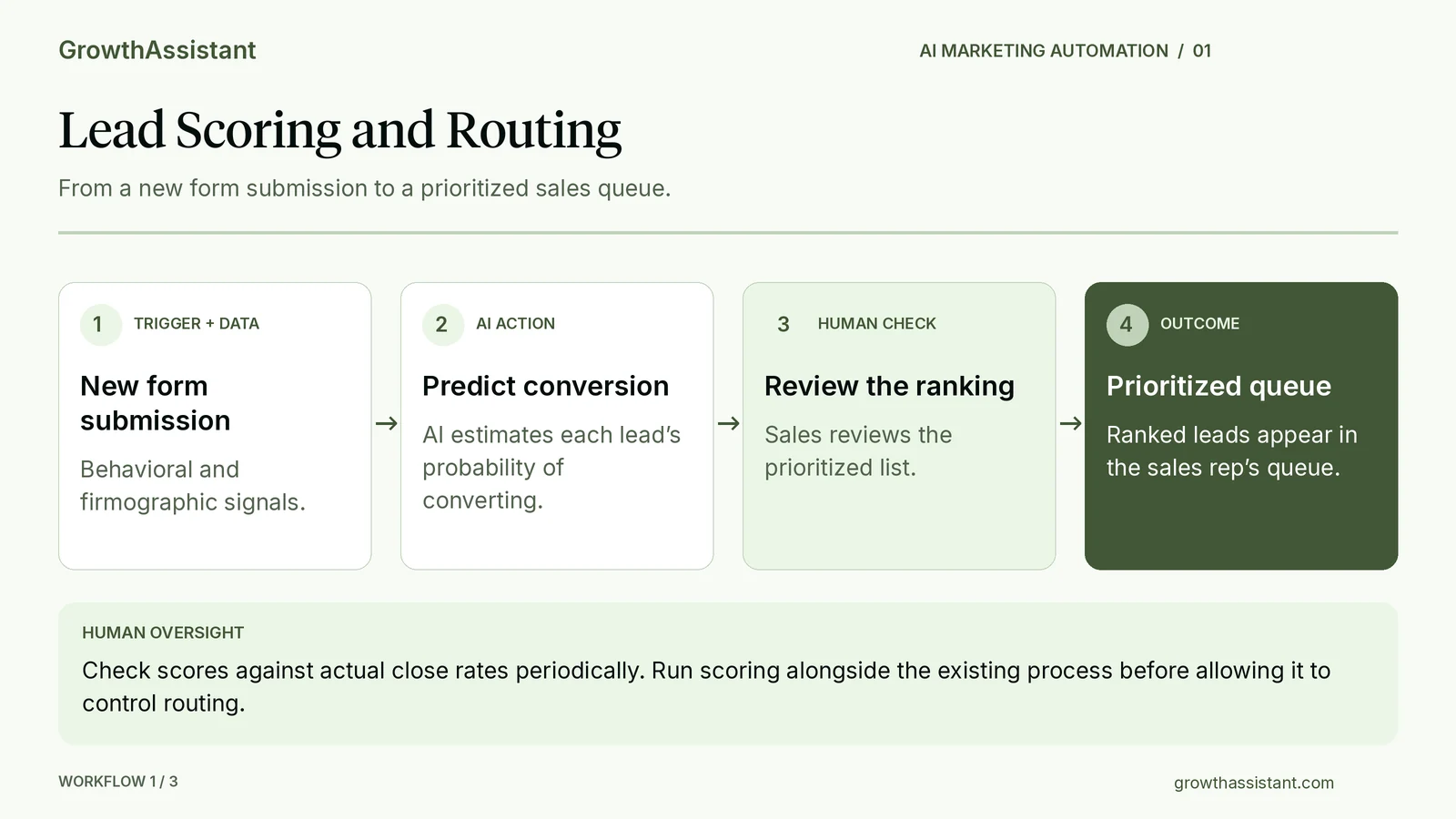
Human checkpoint: sales reviews the ranked list; scoring is periodically checked against actual close rates, and run in parallel with the existing process before it controls routing.
Example 2: Content Repurposing
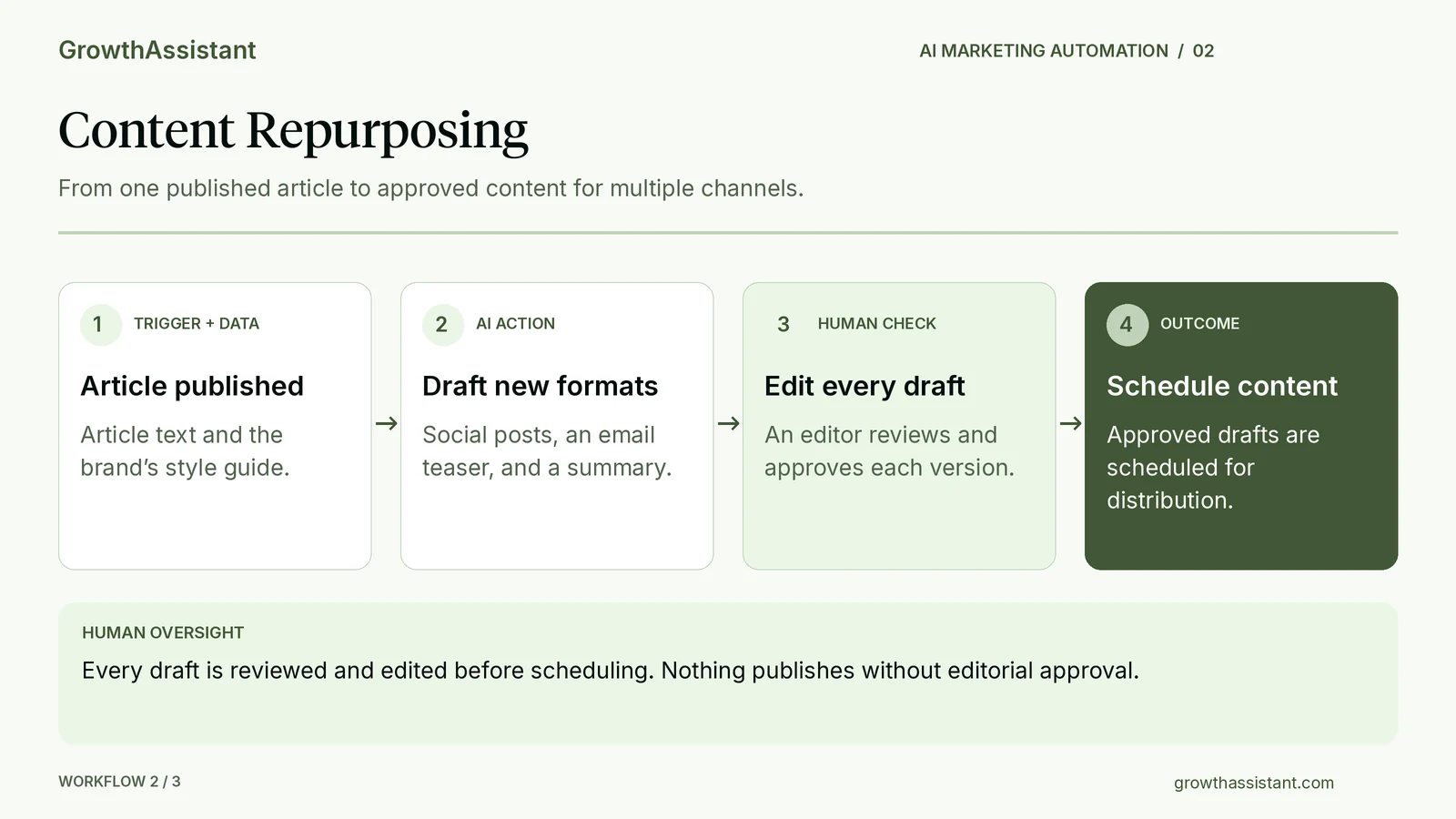
Human checkpoint: an editor reviews and edits every draft before anything is scheduled; nothing publishes unreviewed.
Example 3: Campaign and Email Sequence Adjustment
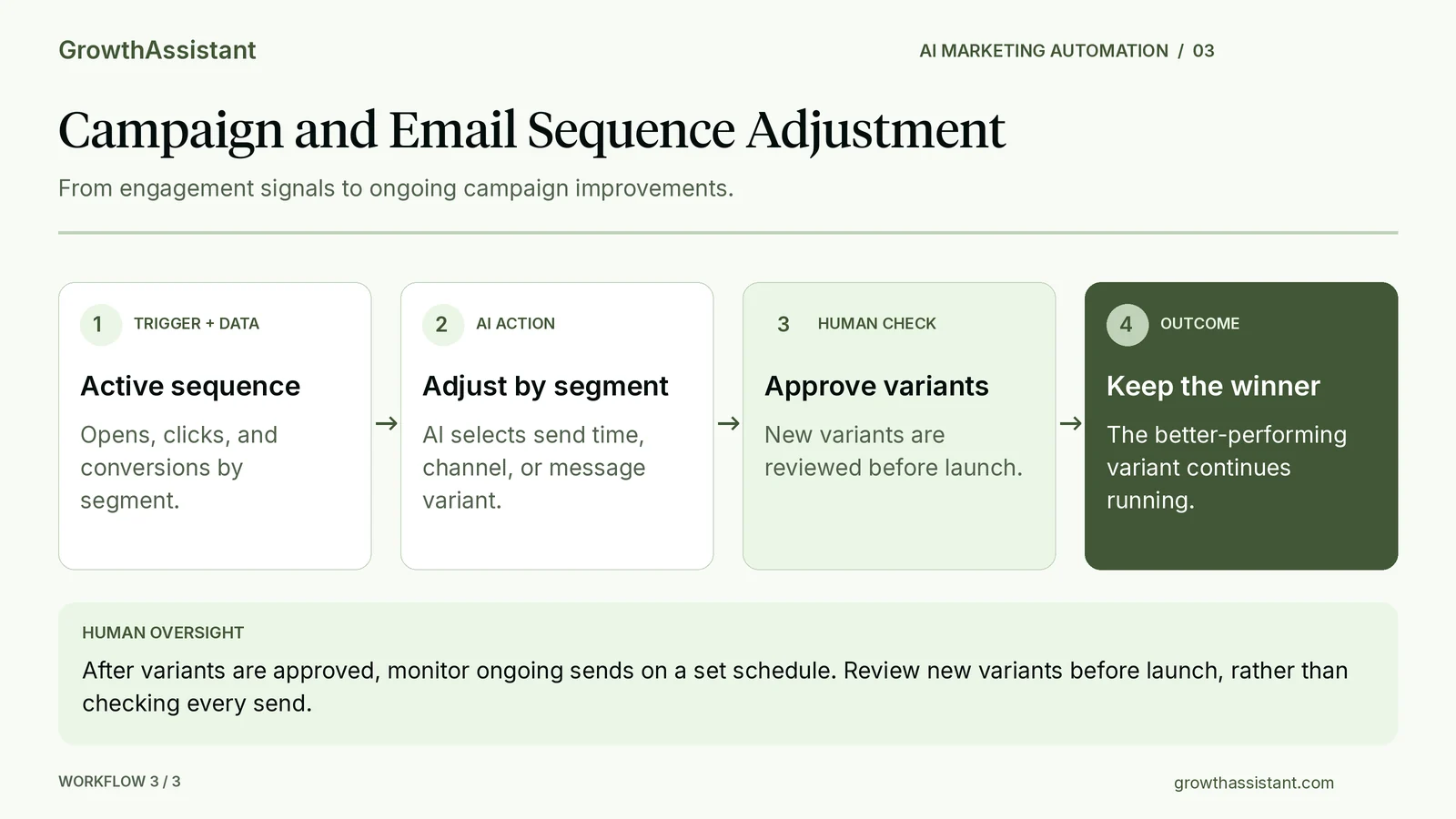
Human checkpoint: new variants are reviewed before launch; once approved, ongoing sends are monitored on a set schedule rather than checked one by one.
How to Evaluate an AI Marketing Automation Platform
A feature list alone won't tell you whether a platform fits your team, almost every vendor now claims lead scoring, generative content, and "AI-powered" everything. The more useful test is running your own workflow through the platform, with your own data, before you commit: ask for a trial or a demo built around one of your actual campaigns, not a canned example.
- Data quality and integration depth. AI marketing automation is only as good as the CRM, ad platform, and analytics data it's reading. A platform that connects cleanly to what you already run beats one with more features and a messier integration.
- Decision transparency. Ask the vendor to show you why the system scored a specific lead the way it did, or why it picked one send time over another, using your own data if possible. If they can't show their work, you won't be able to debug it when it's wrong, and you won't know it's wrong until the results already show it.
- Guardrails and review checkpoints. Confirm whether approval happens once, when a rule or template is set up, or every time the workflow runs. The right answer differs by workflow, so look for a platform that supports both: full review for new or unusual output, lighter monitoring for content that's already been approved.
- Total cost, not just the license. Add up licensing and implementation, then the parts that are easy to miss: ongoing maintenance, any per-use API costs, the time a person spends reviewing output, and the cost of fixing it when something ships wrong. Weigh that total against the specific, named workflow it replaces, not a vague promise of efficiency.
- Data portability. Understand what happens to your models, segments, and historical data if you switch platforms later. Vendor lock-in is a real cost that rarely shows up in the sales conversation.
Integrations, permission settings, approval workflows, and how the system explains a score are all things you can and should investigate during evaluation, not surprises you discover three months in. Ask to see each of them before you sign, ideally against your own data.
Where AI Marketing Automation Still Needs a Human
AI marketing automation takes over a meaningful share of the repetitive, data-heavy work. Several categories of work still need a person directly involved, not as a formality, but because the decision doesn't reduce to a pattern in past data:
- Brand voice and creative quality control. A style guide can constrain an AI draft. It can't tell you a joke lands wrong for this audience, or that a headline technically follows every rule and still reads flat. New or unusual output needs a person's review before it ships; once a message or template has been approved, ongoing variations of it can run and be monitored on a schedule instead of checked line by line every time.
- Strategic prioritization. AI can summarize what's happening in the data and flag options worth considering. Deciding what your company should prioritize next quarter, or which tradeoff to make between two reasonable options, is a call that needs a person with context the data doesn't fully capture, and your team should be clear on who makes that call and when to escalate it.
- Complex, relationship-led work. Partnerships, key accounts, and any communication that depends on a person's history with your company benefit from a human touch. Some of that history can live in a CRM and inform an automated message. The real limitation is usually whether that context is actually connected, accurate, and current, and whether anyone has decided who's accountable for a judgment call made on top of it.
- Edge cases, crisis, and sensitive communications. Automation runs well against the pattern it was built for. A PR issue, a data error, a customer complaint that's really a compliance question, or a send that needs to be paused during a sensitive news cycle, need a person to recognize the exception and decide what happens next. AI can help flag that something looks unusual; your team still has to define who decides what to do about it and how fast.
- Cross-functional alignment. Coordinating sales, product, and marketing around a launch depends on trust and context built up in ongoing conversation.
Why So Many AI Marketing Automation Projects Stall
A number of AI automation initiatives don't fail loudly, they get shelved quietly, often without a clear postmortem.
Gartner predicts that over 40 percent of agentic AI projects will be canceled by the end of 2027, citing escalating costs, unclear business value, and inadequate risk controls, and notes many current initiatives are early-stage experiments driven more by hype than a defined use case (Gartner, June 2025).
That prediction covers agentic AI projects broadly, across every function, not marketing automation specifically, and it's a forecast for a future date, not a count of cancellations that have already happened.
It's still a useful data point on how much execution risk this category carries in general, and marketing automation, where projects increasingly include agentic elements like autonomous send-time or budget decisions, isn't exempt from that risk.
On the ground, a few patterns tend to show up before a project gets shelved:
- No workflow was mapped before the platform was bought. The team picks a tool first and works backward to a use case.
- Nobody defined what "good" output looks like. Automation starts producing content or decisions at volume with no baseline to check them against.
- There's no review checkpoint. A bad send or an off-brand email reaches a full list before anyone catches it.
- The team that owns the tool doesn't have the operations skill set to maintain it. Output quality drifts and nobody notices until the numbers look off.
Mapping the workflow and assigning an owner before turning automation on prevents most of this.
Here's what that looks like in practice, not a hypothetical: GrowthAssistant tested a $999/month AI SEO agent with direct publishing access for three months, no human review gate, producing two to three articles a day.
Impressions rose 75%, but clicks increased only 6%, and an outside SEO consultant recommended unpublishing most of what it had produced.
Once a Growth Assistant took over running the same tool, adding the briefing, review, and judgment it didn't have on its own, four of those articles reached top rankings: #2, #4, #6, and #8. Read the full case study for the details.
The pattern matches what shows up across stalled automation projects generally: no owner watching the output, no review checkpoint, and no baseline for what "good" was supposed to look like before the volume started.
A Practical Framework for Rolling Out AI Marketing Automation
A workable rollout doesn't start with picking a tool. It starts with the workflow.
- 1. Inventory the repetitive work first. Before evaluating any platform, list the tasks your team repeats every week with little variation: reporting rollups, lead routing, first-draft content, campaign QA. That list is your actual use case backlog, not whatever a vendor demo shows you.
- 2. Start with one contained use case, not "AI everywhere." Reporting rollups are a safe starting point, since nothing changes for a customer if a chart is briefly off. Lead scoring is a common second step, but because a wrong score can misdirect sales effort, run it in parallel with your current process first, comparing its rankings against what reps are actually closing, before it controls routing.
- 3. Define the human checkpoint before you automate, not after. Decide up front what gets reviewed before it ships, who reviews it, and what the escalation path is when the automation produces something off. If you can't answer that, you're not ready to turn it on for anything customer-facing.
- 4. Track a small number of workflow-specific metrics. Time saved is only half the picture, also track time spent reviewing and correcting output, plus one outcome metric suited to the workflow: prioritization accuracy for lead scoring, conversion rate for a sequence, or rework reduction for content drafts.
- 5. Assign clear ownership. Someone specific needs to own the platform, the rules it runs on, and the quality of what it produces, the same way you'd assign ownership of any other system that touches customers.
- 6. Define the failure path before you need it. Decide what triggers a pause (an error rate above a set threshold, a data feed going stale, a metric moving further than expected), who gets alerted, and how to fall back to the manual process quickly if the automation needs to be switched off.
Automation nobody revisits eventually breaks or gets shelved. Automation with a clear owner keeps running.
Building an AI-Augmented Marketing Ops Function
The most effective setup is AI tools run by a marketing ops hire. That person configures the platform, writes the rules and guardrails it runs on, reviews new or unusual output before it ships, and keeps an eye on drift over time.
Strategic prioritization, the final call on brand voice, and how to handle a genuine crisis or edge case stay with marketing leadership or the relevant specialist, the operations role runs the system, it doesn't replace the judgment calls above that a person still has to make.
For a lot of growing teams, the practical bottleneck isn't the software, it's finding someone with the marketing operations skill set to run it well day to day: configuring the platform, writing the guardrails, catching a bad output before it reaches a customer, and flagging when the reporting looks off.
That's the core of what a dedicated digital marketing assistant does: manage the automation platform, review AI-generated output on the schedule the workflow actually needs, and escalate anything that falls outside their scope.
Unwatched automation drifts or fails quietly. Pairing the workflows with someone trained to run and maintain them is what keeps AI marketing automation delivering the upside.
How GrowthAssistant Helps
GrowthAssistant places full-time, AI-certified marketing talent starting at $3,500/month, with month-to-month terms and no placement fee, so a small budget can fund a real full-time hire instead of a fraction of one.
Every placement comes with a 100% lifetime match guarantee, so a wrong first match doesn't cost you the budget you can't afford to lose.
Clients include HubSpot, DoorDash, Dr. Squatch, SoFi, Calm, Harry's, Talkspace, and quip.


.svg)